Multifunction Printers & Copiers
Print, copy, scan, and manage documents more efficiently.
Whether your business depends on high-volume black and white printing or high-quality colour printing, choosing the right office copier or multifunction printer (MFP) has a direct impact on your costs, productivity, and workflows. And if your current device is more than five years old, it may already be working against you.
What is a Multifunction Printer MFP) or Office Copier?
A Multifunction Printer (MFP) or copier is an all-in-one office machine that consolidates printing, scanning, copying, and faxing into a single device. Also known as an all-in-one (AIO) printer or multifunction device (MFD), it reduces costs, saves office space, and streamlines workflows by combining multiple functionalities.
Key Multifunction Printer Features for Office Productivity
Modern MFPs can be customized to match your workflows, security requirements, print volumes, scanning needs, and office productivity goals. From cloud connectivity to advanced finishing, here are some of the most valuable features available in modern office copiers.
Automatic Document Feeder (ADF)
Crucial for high-volume jobs, an ADF allows users to place a stack of documents into a tray for automatic copying, scanning, or faxing without manual intervention. Single-Pass Duplex Scanning & Printing also increases speed and helps save on paper costs.
Advanced Finishing Capabilities
Automatic stapling, hole punching, booklet-making, and folding save significant time and manual effort, producing professional-grade documents in-house.
Mobile/Remote Printing
Print securely from smartphones, tablets, laptops, or remote locations.
Optical Character Recognition (OCR)
Converts scanned paper documents into searchable and editable digital text files (PDF, Word, Excel).
Scan-to-Email/Folder/Cloud:
Scans documents directly into digital workflows (like email, shared servers, or cloud storage) to reduce paper dependency.
User Authentication/Secure Print Release
Requires a PIN or ID card to release print jobs, ensuring sensitive documents are not left in the tray. Learn more about copier security features.
How to Choose the Right Copier or MFP for Your Business
The right multifunction printer for a 5-person law firm looks very different from what a 200-person organization needs. Before you start comparing brands and specs, answer these six questions first.
Speak to a Copier Expert Read Our Ricoh MFP Review GuideWhat do you actually need it to do?
Print only, or print, copy, scan, and fax? Do you need colour output, finishing options like stapling or booklet-making, or a smart device that can read text with OCR?
How much will you print each month?
Every MFP is engineered for a specific monthly print volume. As a rule of thumb: 4,000–7,000 pages/month suits a 25 ppm device; 20,000+ pages/month typically requires 50 ppm or more.
What is your budget to purchase a copier?
Commercial-grade copiers range from $7,500 to $25,000. But the purchase price is only part of the picture. Factor in toner, maintenance, and whether buying outright or leasing makes more sense for your cash flow.
Who's handling service and supplies?
Ask any prospective vendor: What's your average response time? How do I reorder toner? Do you offer automatic fulfilment? A great copier with poor local support is a liability, not an asset.
Will it work with your existing systems?
Mac or PC? Cloud-based workflows? On-premise servers? Compatibility determines whether all the features you're paying for actually function in your environment from day one.
Colour or black and white?
If most of your documents are internal (reports, contracts, memos), a monochrome MFP will cost significantly less per page. If you're producing client-facing materials or marketing collateral in-house, colour is worth the investment.
How Much Does a Multifunction Printer Cost?
In the broadest sense, a commercial-grade MFP could cost anywhere from $7,500 to $25,000, but a vast range doesn’t help you budget how much you need to buy your business a new device.
The primary factor that most impacts your final price is how many pages you intend to print every month (your monthly printing “volume”).
Here are the four main categories of devices we find our customers using as well as their approximate costs.
-
25 ppm MFD – $7500 to $11 000
-
30 ppm MFD – $10 500 to $14 500
-
45 ppm MFD – $12 500 to $18 000
-
60 ppm MFD – $14 000 to $22 000
Buying vs Leasing a Copier
If you plan on regularly upgrading your device then leasing will be the right solution for you. Dealers are often willing to help you roll your lease over into a new contract for a new device before your existing term is finished.
While on the other hand, organizations that want to treat their devices as assets or want to avoid taking on a lease liability may prefer to purchase their copier outright.
Buying a Copier
Leasing a Copier
Costs
Buying has a high initial cost but lower overall cost over time.
Leasing has lower upfront costs but higher long-term costs.
Maintenance
Owners must pay for repairs, which can be frequent for older machines. Will you pay for this servicing on a time and materials basis or will you purchase a service contract?
Leases often include service agreements.
Upgrades
Buying locks you into a machine that may become obsolete in 4-6 years.
Leasing allows access to the latest technology (e.g., security, speed) easily.
Ownership
Buying gives you control.
Leasing means you do not own the asset.
Buying a Copier
Leasing a Copier
Costs
Buying has a high initial cost but lower overall cost over time.
Maintenance
Owners must pay for repairs, which can be frequent for older machines. Will you pay for this servicing on a time and materials basis or will you purchase a service contract?
Upgrades
Buying locks you into a machine that may become obsolete in 4-6 years.
Ownership
Buying gives you control.
Costs
Leasing has lower upfront costs but higher long-term costs.
Maintenance
Leases often include service agreements.
Upgrades
Leasing allows access to the latest technology (e.g., security, speed) easily.
Ownership
Leasing means you do not own the asset.
Real Results
Legal

''The team is professional and explains the pros and cons and why they recommend a product or service so that you, as the client, can make an informed decision. They are quick to help us with our phones or fax/copier as needed. Very knowledgeable and patient; explains concepts and solutions well and ensures that you, as the client, understand a product's functions and how to use them as easily as possible.''
Jennifer Donovan | Founder and CEO | J. Donovan Law Group

Education

Office Interiors manages and services over 650 print equipment across 13 locations, including production printers, multifunction printers, and standard office printers.
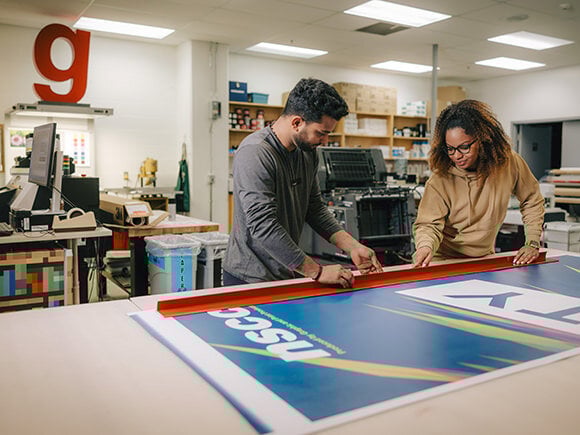
Beyond everyday printing, NSCC students gain hands-on experience in their campus print shops, utilizing Ricoh production devices to learn, design, and create professional-quality materials.
Not-for-profit

Office Interiors manages and services over 300 devices, including production printers, multifunction printers, and standard office printers, across multiple Medavie Blue Cross locations in Canada. These devices support essential operations such as secure claims processing, document management, and daily business communications.

FAQs
Below are answers to some of the most frequently asked questions about multifunction printers/copiers that will help you make an educated and informed decision.
What is a multifunction printer (MFP) and how is it different from a regular printer?
Modern multifunction printers (MFPs), also known as copiers, are devices that can copy, print, scan and (usually) fax, though they are used most often for the printing of office documents.
Is leasing or buying an MFP better for my business?
The upfront cost of buying is higher while leasing allows you to spread out smaller payments over time which may be more budget or cash-flow-friendly for companies with slim budgets. Whether you should buy or lease your device depends on the needs and requirements of your organization. Here are some considerations to help you decide.
What’s the difference between an inkjet and a laser MFP?
Inkjet printers use liquid ink for vibrant colours and high-quality images, making them ideal for photos and creative work. Laser printers use toner powder and heat, delivering faster, sharper text for high-volume business printing. Read more about the differences here.
Do I need a colour or black & white MFP for my office?
The best choice depends on your business needs. Before deciding, consider key factors like cost, print volume, and the type of documents you produce. To help you make an informed decision, check out:
5 Key Factors to Consider Before Buying a Colour Copier/MFP
Top 4 Challenges of Using a Monochrome (Black & White) Copier/MFP
What kind of warranty comes with a multifunction printer?
Most multifunction printers (MFPs) come with a standard manufacturer’s warranty covering defects in materials and workmanship for 90 days to one year. However, consumables like toner and drums are typically excluded. Businesses looking for long-term coverage and maintenance often opt for extended warranties or service agreements.
For a deeper dive into MFP warranty coverage, exclusions, and fine print, check out our full guide here.
Does Office Interiors provide local service & support for MFPs?
Yes! We have dedicated service team members in every city where we operate, including Halifax/Dartmouth, Sydney, Moncton, Fredericton, and Bathurst. Additionally, we have remote service technicians based in Bridgewater, Annapolis Royal, Antigonish, New Glasgow, Charlottetown, Summerside, Saint John, Miramichi, and Edmundston. With a strong presence across Nova Scotia, New Brunswick, and Prince Edward Island, our expert technicians ensure fast, reliable service to keep your office equipment running smoothly. We're a certified Pros Elite 100 Dealer and have been recognized as a 'World Class Service Provider' by NPS Calculator, CEO Juice.
Want Some More Help With Selecting Your New MFP?
Have you read through all this information and still feel nervous about pulling the trigger on a new copier? One of our experts can guide you through the process from start to finish.
Just request your free office technology consultation, and one of our tech experts will sit down with you to estimate your monthly printing volumes, assist in determining which device is the best fit for that volume, select the optional features and configurations best suited to your business needs and provide a price for it all.